> ## Documentation Index
> Fetch the complete documentation index at: https://docs.qwairy.co/llms.txt
> Use this file to discover all available pages before exploring further.
# Response Analysis
> Analyze AI-generated responses about your brand
The **Responses** section in Qwairy allows you to track and analyze AI-generated responses that mention your brand, helping you understand how large language models (LLMs) like OpenAI, Perplexity, or Anthropic are presenting your products and competitors to users.
## **2. Dashboard Overview**
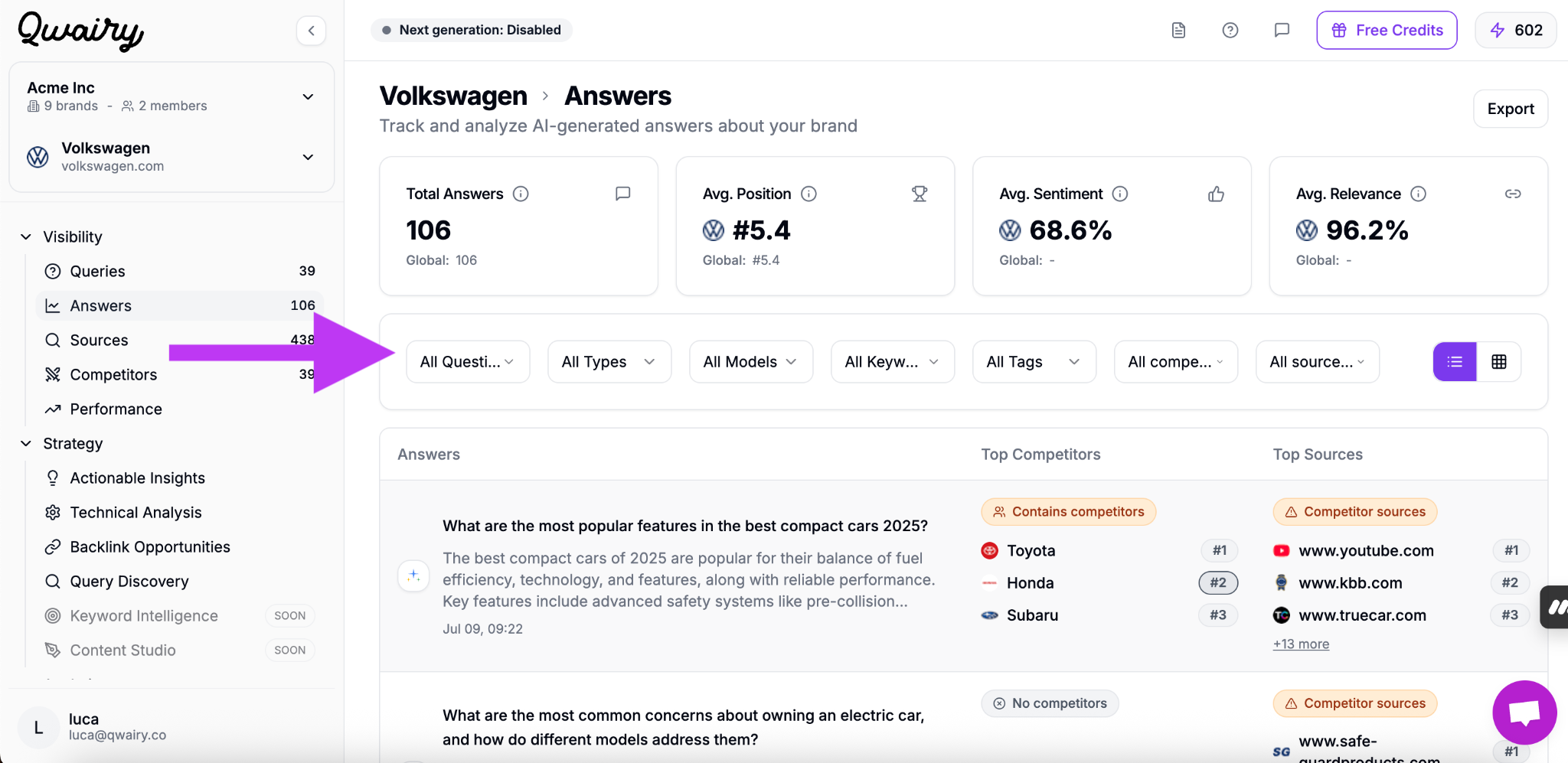
At the top of the **Responses** section, you'll find key metrics summarizing your brand's AI performance across all tracked responses:
### 📊 Key Metrics
* **Total Responses:**\
The total number of AI-generated responses that mention your brand across all selected prompts.
* **Avg. Position:**\
Your brand's average ranking when it is mentioned in responses (e.g., #5.4 means your brand appears, on average, in the 5th position).
* **Avg. Sentiment:**\
The average sentiment score (from 0% to 100%) of responses containing your brand, helping you monitor whether mentions are generally positive, neutral, or negative.
## **3. Filtering & Customization**
To make analysis easier and more actionable, the Responses dashboard includes powerful filters that allow you to slice your data in a variety of ways:
### 🔍 Available Filters
* **By Question:**\
You can filter responses by specific prompts you've previously tracked in the Prompts section. This ensures full alignment between user intent and brand response.
* **By Type:**\
Filter based on funnel stage:
* **Top of Funnel:** Awareness-oriented responses.
* **Middle of Funnel:** Consideration-level content.
* **Bottom of Funnel:** Purchase-oriented responses.
* **By AI Model:**\
Focus your analysis on specific LLMs like:
* ChatGPT (OpenAI)
* Claude (Anthropic)
* Gemini (Google)
* Sonar (Perplexity)
* AI Overview (Google)
* **By Topics:**\
See responses that match specific themes (e.g., "electric car," "affordable SUVs," "2025 compact cars") to evaluate positioning on targeted topics.
* **By Tags:**\
Use custom tags applied during onboarding or analysis to organize and segment responses by campaign, product line, or strategic initiative.
* **By Competitor Visibility:**\
Identify which responses contain competitors (fully, partially, or not at all). This helps you find opportunities to improve your share of voice or flag potential risks.
* **By Source Status:**\
Filter responses by how your brand relates to the sources cited. Options are **All sources**, **You mentioned**, **Needs action**, **Has sources**, and **No sources** — so you can quickly isolate the responses where you appear, where you're missing, or where no source was cited at all.
## **4. Response Breakdown & Insights**
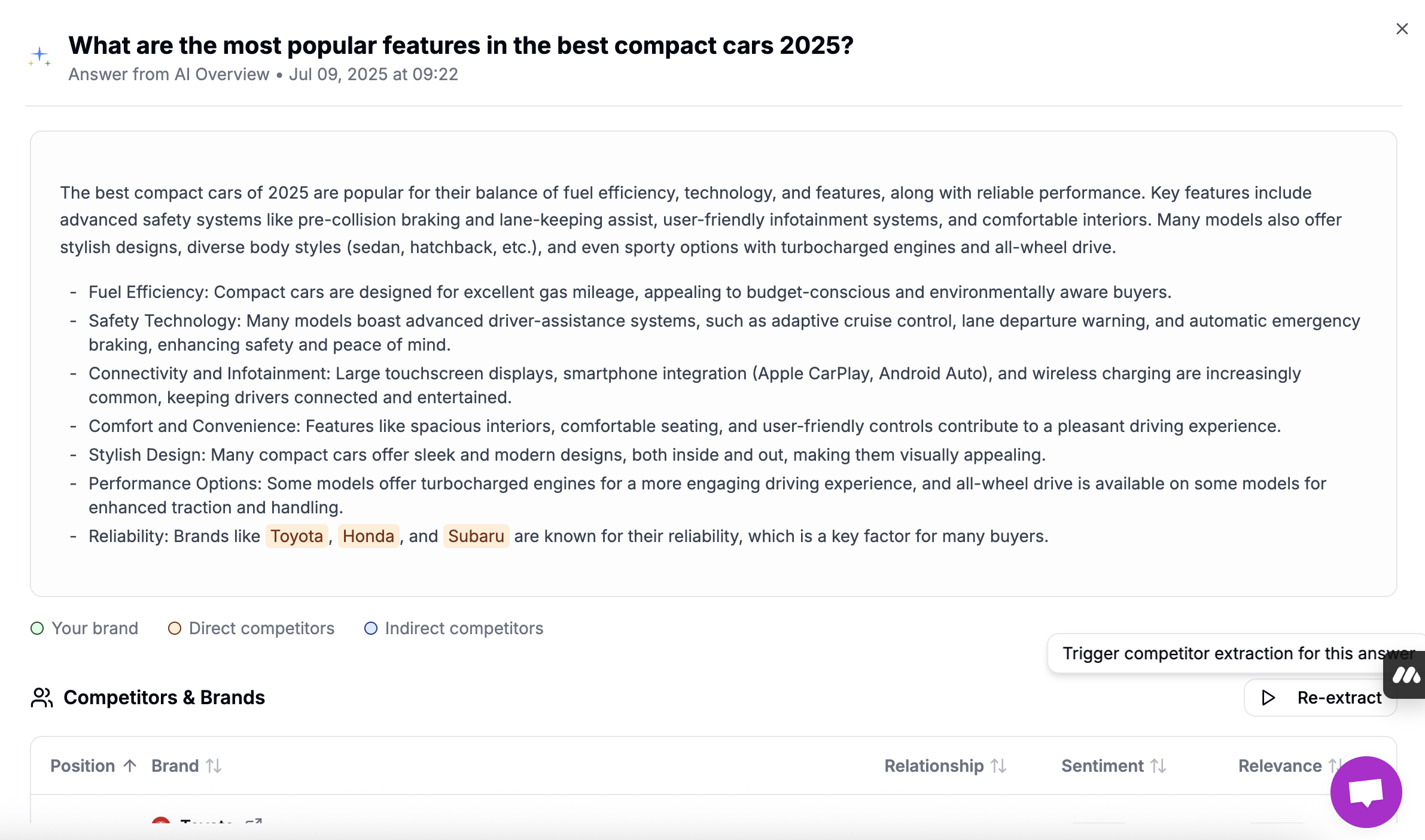
Each response card in Qwairy gives you a complete view of how your brand — and your competitors — are being represented in a specific AI-generated response.
### 🧾 What Each Response Contains
* **Full AI-Generated Response:**\
You see the *exact* text that was generated by the LLM, just as a user would.
* **AI Provider:**\
The model that generated the response is clearly labeled (e.g., ChatGPT, Perplexity, Gemini, Claude, AI Overview), letting you track patterns by provider.
* **Prompt Context:**\
The question that triggered this response is shown at the top, so you know the user intent behind the result.
* **Timestamp:**\
The date and time when the response was retrieved — useful for monitoring how AI behavior evolves over time.
## Related use cases
* [What does AI actually say about my brand?](/use-cases/reputation/what-does-ai-say-about-my-brand)
* [Why does ChatGPT recommend my competitor instead of me?](/use-cases/providers/why-chatgpt-recommends-competitor)
 ### 📊 Key Metrics
* **Total Responses:**\
The total number of AI-generated responses that mention your brand across all selected prompts.
* **Avg. Position:**\
Your brand's average ranking when it is mentioned in responses (e.g., #5.4 means your brand appears, on average, in the 5th position).
* **Avg. Sentiment:**\
The average sentiment score (from 0% to 100%) of responses containing your brand, helping you monitor whether mentions are generally positive, neutral, or negative.
## **3. Filtering & Customization**
To make analysis easier and more actionable, the Responses dashboard includes powerful filters that allow you to slice your data in a variety of ways:
### 🔍 Available Filters
### 📊 Key Metrics
* **Total Responses:**\
The total number of AI-generated responses that mention your brand across all selected prompts.
* **Avg. Position:**\
Your brand's average ranking when it is mentioned in responses (e.g., #5.4 means your brand appears, on average, in the 5th position).
* **Avg. Sentiment:**\
The average sentiment score (from 0% to 100%) of responses containing your brand, helping you monitor whether mentions are generally positive, neutral, or negative.
## **3. Filtering & Customization**
To make analysis easier and more actionable, the Responses dashboard includes powerful filters that allow you to slice your data in a variety of ways:
### 🔍 Available Filters
 ## Related use cases
* [What does AI actually say about my brand?](/use-cases/reputation/what-does-ai-say-about-my-brand)
* [Why does ChatGPT recommend my competitor instead of me?](/use-cases/providers/why-chatgpt-recommends-competitor)
## Related use cases
* [What does AI actually say about my brand?](/use-cases/reputation/what-does-ai-say-about-my-brand)
* [Why does ChatGPT recommend my competitor instead of me?](/use-cases/providers/why-chatgpt-recommends-competitor)