> ## Documentation Index
> Fetch the complete documentation index at: https://docs.qwairy.co/llms.txt
> Use this file to discover all available pages before exploring further.
# Sentiment
> Monitor how your brand is perceived in AI-generated answers — across all providers, topics, and competitors.
Navigate to **Analyze > Sentiment** in the left navigation menu.
Qwairy automatically analyzes the tone and contextual positioning of your brand within thousands of AI-generated responses.
Each mention receives a **Sentiment Score** on a **0–100 scale** — measuring how positively or negatively your brand is described. The higher the score, the more positive the tone. This metric helps you understand not just *what* LLMs say about you, but *how* they say it.
## Main Dashboard
The Sentiment Analysis dashboard displays aggregated data for your selected brand or competitor.
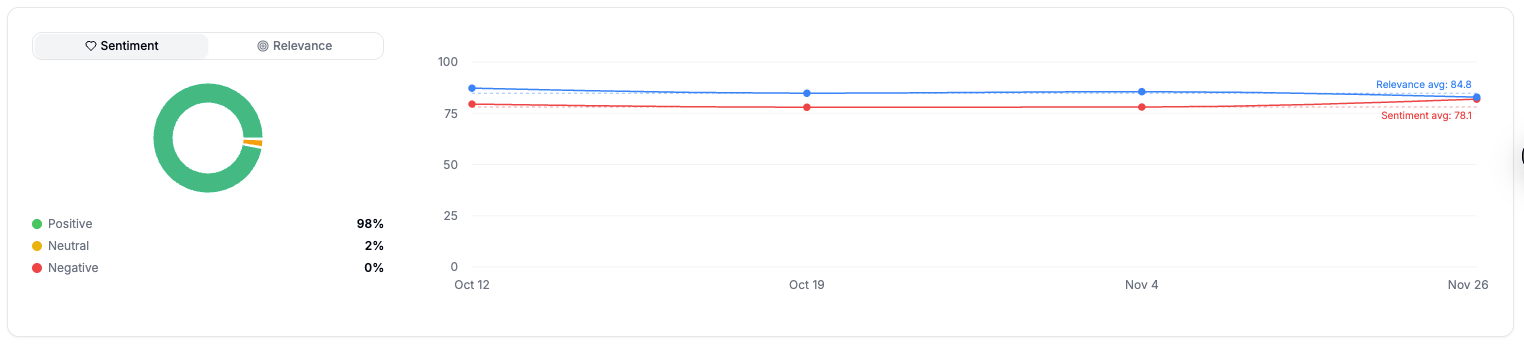
### **1. Sentiment Overview**
A circular chart classifies all analyzed mentions into:
* 🟢 **Positive** — favorable tone or endorsement
* 🟠 **Neutral** — factual, descriptive, or balanced mention
* 🔴 **Negative** — unfavorable, critical, or dismissive tone
Example:
> Nike shows **98% Positive**, **2% Neutral**, **0% Negative** — indicating strong brand perception across AI responses.
### **2. Filters and Comparison Options**
You can filter or compare data by:
| Filter Type | Description |
| :------------- | :--------------------------------------------------------------------------------- |
| **Brand** | Switch between *Self* (your brand) and *Competitors* from your tracked list. |
| **Provider** | Analyze mentions from ChatGPT, Gemini, Claude, Perplexity, or others. |
| **Topic** | Focus on specific categories like *running shoes*, *sportswear*, or *gym clothes*. |
| **Time Range** | View sentiment trends *All time* or for specific periods. |
| **Sort Order** | Display *Newest first* or *Oldest first* mentions. |
### 3. Mention-Level View
Below the chart, each mention is listed with full context, including:
* **Brand name and domain**
* **Sentiment score** on a 0–100 scale (e.g., `85.00`)
* **Provider** (ChatGPT, Claude, etc.)
* **Topic** (e.g., *running shoes*)
* **Prompt** that generated the mention
* **AI-generated summary** describing the tone and positioning
## Exporting Data
Click **Export** (top right) to download:
* All sentiment data
* Time series data (CSV)
* Mention-level summaries
Use exports for:
* Brand perception reporting
* Competitive benchmarking
* Marketing or PR dashboards
## Related use cases
* [Is AI generating negative sentiment about my brand on specific topics?](/use-cases/reputation/negative-sentiment-on-topics)
* [How has AI sentiment changed after a PR crisis or product launch?](/use-cases/reputation/sentiment-after-crisis-or-launch)
* [How does my brand's sentiment compare to competitors?](/use-cases/competitors/sentiment-vs-competitors)
 ### **2. Filters and Comparison Options**
You can filter or compare data by:
| Filter Type | Description |
| :------------- | :--------------------------------------------------------------------------------- |
| **Brand** | Switch between *Self* (your brand) and *Competitors* from your tracked list. |
| **Provider** | Analyze mentions from ChatGPT, Gemini, Claude, Perplexity, or others. |
| **Topic** | Focus on specific categories like *running shoes*, *sportswear*, or *gym clothes*. |
| **Time Range** | View sentiment trends *All time* or for specific periods. |
| **Sort Order** | Display *Newest first* or *Oldest first* mentions. |
### 3. Mention-Level View
Below the chart, each mention is listed with full context, including:
* **Brand name and domain**
* **Sentiment score** on a 0–100 scale (e.g., `85.00`)
* **Provider** (ChatGPT, Claude, etc.)
* **Topic** (e.g., *running shoes*)
* **Prompt** that generated the mention
* **AI-generated summary** describing the tone and positioning
## Exporting Data
Click **Export** (top right) to download:
* All sentiment data
* Time series data (CSV)
* Mention-level summaries
Use exports for:
* Brand perception reporting
* Competitive benchmarking
* Marketing or PR dashboards
## Related use cases
* [Is AI generating negative sentiment about my brand on specific topics?](/use-cases/reputation/negative-sentiment-on-topics)
* [How has AI sentiment changed after a PR crisis or product launch?](/use-cases/reputation/sentiment-after-crisis-or-launch)
* [How does my brand's sentiment compare to competitors?](/use-cases/competitors/sentiment-vs-competitors)
### **2. Filters and Comparison Options**
You can filter or compare data by:
| Filter Type | Description |
| :------------- | :--------------------------------------------------------------------------------- |
| **Brand** | Switch between *Self* (your brand) and *Competitors* from your tracked list. |
| **Provider** | Analyze mentions from ChatGPT, Gemini, Claude, Perplexity, or others. |
| **Topic** | Focus on specific categories like *running shoes*, *sportswear*, or *gym clothes*. |
| **Time Range** | View sentiment trends *All time* or for specific periods. |
| **Sort Order** | Display *Newest first* or *Oldest first* mentions. |
### 3. Mention-Level View
Below the chart, each mention is listed with full context, including:
* **Brand name and domain**
* **Sentiment score** on a 0–100 scale (e.g., `85.00`)
* **Provider** (ChatGPT, Claude, etc.)
* **Topic** (e.g., *running shoes*)
* **Prompt** that generated the mention
* **AI-generated summary** describing the tone and positioning
## Exporting Data
Click **Export** (top right) to download:
* All sentiment data
* Time series data (CSV)
* Mention-level summaries
Use exports for:
* Brand perception reporting
* Competitive benchmarking
* Marketing or PR dashboards
## Related use cases
* [Is AI generating negative sentiment about my brand on specific topics?](/use-cases/reputation/negative-sentiment-on-topics)
* [How has AI sentiment changed after a PR crisis or product launch?](/use-cases/reputation/sentiment-after-crisis-or-launch)
* [How does my brand's sentiment compare to competitors?](/use-cases/competitors/sentiment-vs-competitors)